Pyiron workflows: quickstart
You can start converting python functions to pyiron_workflow nodes by wrapping them with decorators accessible from our single-point-of-entry, the Workflow class:
[1]:
from pyiron_workflow import Workflow
From function to node
Let’s start with a super simple function that only returns a single thing
[2]:
@Workflow.wrap.as_function_node
def AddOne(x):
    y = x + 1
    return y

node = AddOne()
This node object can be run just like the function it wraps
[3]:
node(42)
[3]:
43
But is also a class instance with input and output channels (note that here the output value takes its name based on what came after the return statement)
[4]:
node.inputs.x = 0
node.run()
node.outputs.y.value
[4]:
1
So other than being delayed, these nodes behave a lot like the regular python functions that wrap them. Notice that the node object has named inputs and outputs – unlike a regular function for which only inputs are named.
These are “data channels” for the node. The names of input channels is obvious from the signature of the decorated function. We’ll see later how to pass specific output names to the as_function_node decorator, but in this case y was just scraped automatically from the text of the return y statement – a good encouragement to use meaningful variable names and then return them.
Just like regular functions, we can nest function nodes together – the result is still delayed, so we need to call the nested object at the end:
[5]:
calculation = AddOne(AddOne(AddOne(2)))
calculation()
[5]:
5
But they are actually nodes, and what we saw above is just syntactic sugar for building a graph connecting the inputs and outputs of the nodes:
[6]:
n1 = AddOne()
n2 = AddOne()
n3 = AddOne()

n2.inputs.x = n1.outputs.y
n3.inputs.x = n2.outputs.y

n1.inputs.x = 0
n3()
[6]:
3
In the special case that a node has only one output channel (i.e. only one return value in the decorated function), this object will fall back on trying to perform operations on that output channel! Combining this with the syntactic sugar for using the function signature to set input values, we can equivalently write the example above as:
[7]:
n1 = AddOne(x=0)
n2 = AddOne(x=n1)
n3 = AddOne(x=n2)
n3()
[7]:
3
Let’s come back to how output data channels are named. Sometimes you want to return something that looks “ugly” – like x + 1 in the example above – or perhaps you’re making a function node out of a function you didn’t write and don’t have the power to change. In the former case you can create a new local variable that looks “pretty” (y = x + 1 above) and return that, but in either case you can pass an output label to the decorator. Nodes also pull hints and defaults from the function
they wrap. We can re-write our example above to leverage all of this:
[8]:
@Workflow.wrap.as_function_node("y")
def AddOne(x: int) -> int:
    return x + 1

AddOne.preview_io()
[8]:
{'inputs': {'x': (int, NOT_DATA)}, 'outputs': {'y': int}}
Putting it together in a workflow
We can work with nodes all by themselves, but since the whole point is to connect them together to make a computation graph, we can get extra tools by intentionally making these children of a Workflow node.
The Workflow class not only gives us access to the decorators for defining new nodes, but also lets us access a core set of existing nodes. Let’s put together a workflow that uses both an existing node from the creator, and another function node that has multiple return values. This function node will also exploit our ability to name outputs (in the decorator argument) and give type hints (in the function signature, as usual).
In addition to using output channels (or nodes, if they have only a single output) to make connections to input channels, we can perform many (but not all) other python operations on them to dynamically create new nodes! Below see how we do math and indexing right on the output channels:
[9]:
wf = Workflow("my_workflow")

@Workflow.wrap.as_function_node("range", "length")
def Range(n: int) -> tuple[list[int], int]:
    """
    Two outputs is silly overkill, but just to demonstrate how Function nodes work
    """
    r = range(n)
    return list(r), len(r)


wf.range = Range()
wf.last_square = wf.range.outputs.range[-1]**2
We also can visualize the workflow to see its constituents and connections:
[10]:
wf.draw(size=(10,10))
[10]:
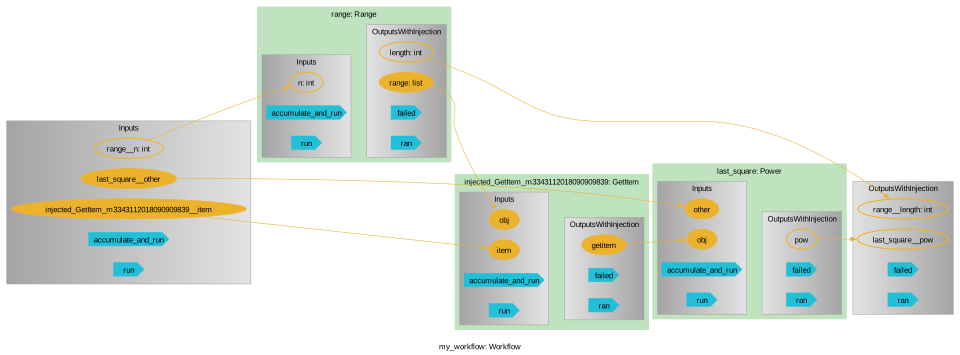
We can see that the workflow automatically exposes unconnected IO of its children and gives them a name based on the child node’s name and that node’s IO name. Further, the math and indexing we do automatically injects new nodes after the output. Note that even though we perform a slice on wf.arange.outputs.arange twice, only a single node is created and it simply gets reused – the graph is aware of all the dynamically injected nodes and reuses them like this for computational efficiency.
Let’s run our workflow and look at the result:
[11]:
wf(range__n=5)
[11]:
{'range__length': 5, 'last_square__pow': 16}
Unless it’s turned off, pyiron_workflow will make sure that all new nodes and connections obey type hints (where provided). For instance, if we try to pass a non-int to our square_range node, we’ll get an error:
[12]:
try:
    wf.range.inputs.n = 5.5
except TypeError as e:
    message = e.args[0]
    print(message)
The channel /my_workflow/range.n cannot take the value `5.5` (<class 'float'>) because it is not compliant with the type hint <class 'int'>
Aside: it’s usually wise to start working with a workflow right away, but if for some reason you have a set of un-parented nodes that you’ve been working with, you can always add them to a workflow, e.g. at workflow instantiation.
[13]:
some_node = Range(n=5)
biggest_of_some_node = some_node.outputs.range[-1]
some_other_node = Range(n=biggest_of_some_node)
some_other_node.pull()
[13]:
([0, 1, 2, 3], 4)
The only hiccup to this is that they’ll each need unique names. We can get the workflow to convert the names on-the-fly by setting strict_naming=False:
[14]:
oh_no_I_need_a = Workflow(
    "post_facto",
    some_node,
    biggest_of_some_node,
    some_other_node,
    strict_naming=False
)
oh_no_I_need_a.child_labels
[14]:
('Range', 'injected_GetItem_m8754842196660514197', 'Range0')
Composing complex workflows from macros
There’s just one last step: once we have a workflow we’re happy with, we can package it as a “macro”! This lets us make more and more complex workflows by composing sub-graphs.
We don’t yet have an automated tool for converting workflows into macros, but we can create them by decorating a function that takes a macro instance and macro input, builds its graph, and returns the parts of it we want as macro output. We can do most of this by just copy-and-pasting our workflow above into a decorated function!
Just like a function node, the IO of a macro is defined by the signature and return values of the function we’re decorating. Just remember to include a self-like argument for the macro instance itself as the first argument, and to only return single-output nodes or output channels in the return statement.
As with function nodes, macro nodes will attemt
[15]:
@Workflow.wrap.as_function_node("next_line")
def Print(message: str, line_number: int = 0) -> int:
    print(line_number, message)
    return line_number + 1


@Workflow.wrap.as_macro_node("n_lines")
def EmailWithLineNumbers(
    self,
    recipient: str,
    body: str,
    sender: str,
    honourific: str = "Dear ",
    salutation: str = "Sincerely,",
):

    # self.greeting = Workflow.create.std.Add(honourific, " ") + recipient
    self.greet = Print(honourific + recipient + ",")
    self.communicate = Print(body, line_number=self.greet)
    self.conclude = Print(salutation, line_number=self.communicate)
    self.from_ = Print(sender, line_number=self.conclude)
    return self.from_
[16]:
wf2 = Workflow("spam_template")

wf2.name = Workflow.create.std.UserInput()
wf2.name.inputs.user_input.type_hint = str

wf2.lined_email = EmailWithLineNumbers(
    recipient=wf2.name,
    body="You may have won some free beer! Please send your credit card number.",
    sender="Elsinore Brewery",
    salutation="Hurry, act fast!",
)

wf2(name__user_input="Bob McKenzie")
0 Dear Bob McKenzie,
1 You may have won some free beer! Please send your credit card number.
2 Hurry, act fast!
3 Elsinore Brewery
[16]:
{'lined_email__n_lines': 4}
[17]:
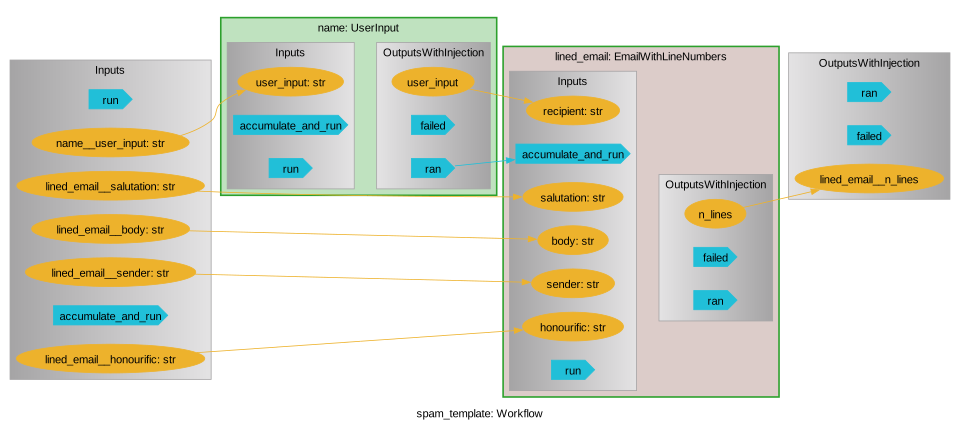
wf2.draw(size=(10,10))
[17]:
[18]:
wf2.lined_email.draw(size=(10,10))
[18]:

Warning: This similarity to how we define a Function node can be a bit dangerous – the body of a Function node operates on its input each time the node runs and can hold arbitrary python code. In contrast, when we decorate a function to turn it into a Macro node, that function definition is run once at instantiation of the macro, and from then the entire graph is what get executed when you run the node. A corollary is that the input to an as_macro_node-wrapped function is
getting transformed into data channels and is not the raw data like in a Function node! While almost all python operations are possible on a data channel, you can’t do everything to it. In the same way, the return values of a macro need to all be data channels.
E.g. Returning a non-data-channel
[19]:
try:
    @Workflow.wrap.as_macro_node("x", "y")
    def Foo(self, a):
        return a + 1, 6

    Foo()
except AttributeError:
    print("Returns a non-data-channel")
Returns a non-data-channel
Solution: honestly, it seems like a strange choice, since this will get run once at instantiation then never updated. But if you really want to, you can always wrap it as a node and then return that:
[20]:
@Workflow.wrap.as_macro_node("x", "y")
def Foo(self, a):
    self.six = Workflow.create.std.UserInput(6)
    return a + 1, self.six

Foo()(a=1)
[20]:
{'x': 2, 'y': 6}
E.g. A much more common problem is to mix-and-match valid macro defining code with some illegal operations:
[21]:
try:
    @Workflow.wrap.as_macro_node
    def Foo(self, a):
        self.number = a + 1
        self.string = str(self.number)
        return self.string

    Foo()
except AttributeError:
    print("De-data-channels `a`")
De-data-channels `a`
Solution: This looks like macro code, but str() is not a python operation, it’s just some function. That means that self.string is actually just some the string representation of the self.number channel as it appears at macro instantiation, and (just like 6 above), not a valid return for a macro-defining function!
This is a common mistake, and basically just amounts to mixing-and-matching function and macro definition code. A simple solution is to simply extract the operation you want performed at each invocation of the graph as its own function node, and then include that in the macro!
[22]:
@Workflow.wrap.as_function_node
def Stringify(a):
    as_string = str(a)
    return as_string

@Workflow.wrap.as_macro_node
def Foo(self, a):
    self.number = a + 1
    self.string = Stringify(self.number)
    return self.string

Foo()(1)
[22]:
{'string': '2'}
Storage
You’ve run you workflow and want to close your notebook for the day – but you don’t want to lose your data state. No problem! Just .save() your workflow. We’ll go back and use our e-mail workflow as an example:
[23]:
wf2.save()
This creates a new save-file at a canonical path based on your workflow’s lexical labeling:
[24]:
for item in wf2.as_path().iterdir():
    print(item)
/Users/liamhuber/dev/pyiron/pyiron_workflow/notebooks/spam_template/picklestorage.pckl
If you want to reload a Macro or Function node that you saved individually, you’ll need to manually invoke the .load method, but by default new Workflow instances check to see if there’s a save file available with their label:
[25]:
wf2_reloaded = Workflow(wf2.label)
wf2_reloaded.outputs.to_value_dict()
[25]:
{'lined_email__n_lines': 4}
If we want to avoid this, we could turn off the auto-loading (or, more brutally, delete_existing_savefiles)
[26]:
wf_not_2 = Workflow(wf2.label, autoload=None)
wf_not_2.outputs.to_value_dict()
[26]:
{}
And we can delete the save-files manually
[27]:
wf2.delete_storage()

wf2.as_path().exists()
[27]:
False
You can manually save any child node, or you can use checkpoint to specify a backend to use for saving the parent-most graph whenever a child finishes running:
[28]:
wf = Workflow("checkpointed")
wf.a = Workflow.create.std.UserInput(42)
wf.b = wf.a + 1
wf.c = wf.b + 1

wf.b.checkpoint = "pickle"
wf()
[28]:
{'c__add': 44}
On reload, we’ll see that the save occured after b but before a:
[29]:
reload_checkpointed = Workflow(wf.label)
for n in reload_checkpointed:
    print(n.label, n.outputs.to_value_dict())
a {'user_input': 42}
b {'add': 43}
c {'add': NOT_DATA}
[30]:
# Lastly, just clean up after ourselves
reload_checkpointed.delete_storage()
Note that we’ve specified a "pickle" storage back-end for saving the workflow. This is – almost – exactly what it sounds like: we’re just pickling the workflow. If needed, this interface will fall back on cloudpickle. This comes with all the same downsides as pickle. The trivial one is that we have saved a workflow that uses nodes defined in ``__main__``, i.e. in this notebook. Until you re-execute those cells, you won’t be able to successfully load the workflow in a fresh python
interpreter session.
More seriously, pickle doesn’t come with any built-in versioning control. That means it is unsuitable for long-term-storage. pickle is just re-importing and re-instantiating classes, so there is no robustness against the underlying node source code changing between save and load time.
Finding/writing a hierarchical, browsable, and versioned storage interface is on our radar, but not currently available. In the meantime, your workflows themselves can be robustly versioned by storing your node and workflow definitions in .py files in a git repo, perhaps released as a versioned python package. If you have a robust way of storing your mission-critical input and associated workflow output data, storing this data and the workflow source code provides an intermediate step to
reproducibility.
Failure recovery
If a graph raises an exception, the default behaviour is to save (pickle) a copy of the node into its directoy under the filename “recovery”. These can then be manually re-loaded to investigate the failure state:
[31]:
wf = Workflow("will_fail")
wf.some_number = Workflow.create.std.UserInput(1)
wf.some_string = Workflow.create.std.UserInput("two")
wf.addition = wf.some_number + wf.some_string

try:
    wf()
except Exception as e:
    print(e)
    print(
        "\nNormally this would have crashed our cell, "
        "but we want the notebook to keep running past it"
    )
/will_fail encountered error in child: {'/will_fail/addition.accumulate_and_run': TypeError("unsupported operand type(s) for +: 'int' and 'str'")}

Normally this would have crashed our cell, but we want the notebook to keep running past it
[32]:
reloaded = Workflow("will_fail")
reloaded.load(filename=reloaded.as_path().joinpath("recovery"))
print("Failed?", reloaded.failed)
reloaded.draw(size=(10, 10))
Failed? True
[32]:
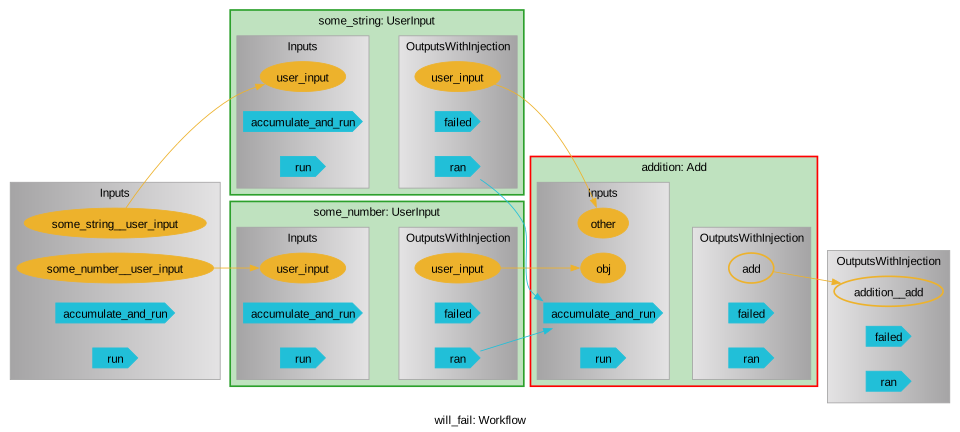
If some earlier part of the graph was expensive, this ensures that we can re-load the failed graph and recover that expensive data; for something flexible like a workflow, we can even easily go in and remove the node that failed and replace it with something more useful. If the workflow was using caching (which it does by default, cf. the deepdive for more info), then re-running the repaired graph is very fast.
[33]:
reloaded.remove_child(reloaded.addition)
reloaded.stringify = Workflow.create.std.String(reloaded.some_number)
reloaded.addition = reloaded.stringify + reloaded.some_string

reloaded.run(rerun=True)  # Re-set the status with `rerun` to be ready to run again
[33]:
{'addition__add': '1two'}
This automatic saving can be disabled by setting the node attribute .recovery to None.
[34]:
# Clean up
reloaded.delete_storage(filename=reloaded.as_path().joinpath("recovery"))
Parallelization
pyiron_workflow actually splits apart data channels and the flow of data from “signal” channels and the flow of execution. This is important for while-loop flows, and if you want to learn more go check out the deepdive.ipynb. Most of the time, workflows form a Directed Acyclic Graph (DAG), and this execution flow can be completely automated – you only need to define the flow of data.
This also means that it’s quite easy to parallelize the execution of your workflow. Nodes each carry an executor attribute that is compatible with and concurrent.futures.Executor that implements a compliant submit method and returns a concurrent.futures.Future object, e.g. concurrent.futures.ThreadPoolExecutor and concurrent.futures.ProcessPoolExecutor, but also the more powerful executorlib.Executor from elsewhere in the pyiron project. Shortcuts to all three of
these live on the Workflow.create menu.
Let’s cook up a simple example to demonstrate this:
[35]:
from concurrent import futures

@Workflow.wrap.as_function_node
def Report(t1, t2, t3):
    tmax = max(t1, t2, t3)
    print("LONGEST", tmax)
    return tmax

wf = Workflow("sleepy")
wf.t_sleep = Workflow.create.std.UserInput(2)
wf.a1 = Workflow.create.std.Sleep(wf.t_sleep)
wf.a2 = Workflow.create.std.Sleep(wf.t_sleep)
wf.a3 = Workflow.create.std.Sleep(wf.t_sleep)
wf.midway = Report(wf.a1, wf.a2, wf.a3)
wf.b1 = Workflow.create.std.Sleep(wf.midway)
wf.b2 = Workflow.create.std.Sleep(wf.midway)
wf.b3 = Workflow.create.std.Sleep(wf.midway)
wf.end = Report(wf.b1, wf.b2, wf.b3)

from time import time

t0 = time()

with futures.ThreadPoolExecutor(max_workers=3) as exe:
    for n in wf:
        if n.label not in ["t_sleep", "midway", "finally"]:
            n.executor = exe
    wf()

print("Total runtime", time() - t0)
LONGEST 2
LONGEST 2
Total runtime 4.04314112663269
We can see that each of the layers who were concurrent in data were also able to execute concurrently in time, with minimal overhead.
Note that here we do need to use a ThreadPoolExecutor (or something more powerful like executorlib) and not ProcessPoolExecutor. This can be understood by thinking back to the storage section: the ProcessPoolExecutor leverages the same serialization as pickle, but starts a fresh python instance – this fresh instance has no access to the Report node we defined in this notebook! This is perfectly reasonable behaviour for ProcessPoolExecutor, but is an easy “gotcha”.
Using the more powerful executor, or moving your nodes over to a .py file they can be imported from are both reasonable solutions.
For-loops
You can quickly iterate over nodes by wrapping them in a for-node and specifying what inputs should be looped over. This comes in two flavours: nested loops with iter_on:
[36]:
n = Workflow.create.for_node(
    Workflow.create.std.Add,
    iter_on=("obj", "other"),
    obj=[1, 2],
    other=[3, 4]
)
out = n()
out
[36]:
{'df':    obj  other  add
 0    1      3    4
 1    1      4    5
 2    2      3    5
 3    2      4    6}
And zipped loops with zip_on. We can also package the output as a dataframe
[37]:
n = Workflow.create.for_node(
    Workflow.create.std.Add,
    zip_on=("obj", "other"),
    obj=[1, 2, 3],
    other=[4, 5, 6],
    output_as_dataframe=True
)
out = n()
out["df"]
[37]:
| obj | other | add | |
|---|---|---|---|
| 0 | 1 | 4 | 5 |
| 1 | 2 | 5 | 7 |
| 2 | 3 | 6 | 9 |
These are nodes, and we can use them as such, e.g. putting them inside macros. One difference between a for-loop and a regular macro, is that we don’t have access to all the subgraph nodes a-priori. These are constructed at runtime, since we will need a different number of them depending how long our loop is. We can still specify an executor for the loop body nodes with the body_node_executor attribute
[38]:
@Workflow.wrap.as_macro_node
def InternallyIterates(self, data: list[int], start: int = 0):
    self.iter_add = Workflow.create.for_node(
        body_node_class=Workflow.create.std.Add,
        iter_on="other",
        obj=start,
        other=data
    )
    self.zip_add = Workflow.create.for_node(
        Workflow.create.std.Add,
        zip_on=("obj", "other"),
        obj=data,
        other=data
    )
    return self.iter_add, self.zip_add

macro_with_for_loops = InternallyIterates()

with futures.ThreadPoolExecutor(max_workers=1) as exe:
    macro_with_for_loops.iter_add.body_node_executor = exe
    out = macro_with_for_loops(data=[1, 2, 3])

out
[38]:
{'iter_add':    other  add
 0      1    1
 1      2    2
 2      3    3,
 'zip_add':    obj  other  add
 0    1      1    2
 1    2      2    4
 2    3      3    6}
Of course, one can combine these zipping on some input and nesting iteratively on others – just provide both kwargs to specify which inputs get used for what
The execultion flow is available both prospectively (by the graph diagram), and retrospectively in terms of either the order in which nodes started executing
[39]:
macro_with_for_loops.provenance_by_execution
[39]:
['data', 'zip_add', 'iter_add']
or the order in which they finished executing (although these only differ for a given graph if executors are used and runtimes vary)
[40]:
macro_with_for_loops.iter_add.provenance_by_completion
[40]:
['obj',
 'other',
 'injected_GetItem_4352004433870591130',
 'injected_GetItem_8068942734875560407',
 'injected_GetItem_m8861920671578530208',
 'body_2',
 'body_1',
 'body_0',
 'row_collector_2',
 'row_collector_1',
 'row_collector_0',
 'dataframe']
Sometimes it might be more useful to break the for-loop output apart into individual channels instead of having it as a dataframe. It’s possible to create new for-loop classes like this by specifying a flag for the output type. In this way, we get individual list-like output channels for all of the looped input and all of output – i.e. each dataframe column gets mapped to a channel instead:
[41]:
wf = Workflow("listlike_for_loop")
wf.first_loop = Workflow.create.for_node(
    Workflow.create.std.Add,
    iter_on="other",
    obj=1,
    other=[1, 2, 4],
    output_as_dataframe=False,
)
wf.second_loop = Workflow.create.for_node(
    Workflow.create.std.Multiply,
    iter_on="other",
    obj=2,
    other=wf.first_loop.outputs.add,
    output_as_dataframe=False,
)
wf()
[41]:
{'first_loop__other': [1, 2, 4],
 'second_loop__other': [2, 3, 5],
 'second_loop__mul': [4, 6, 10]}
In general, the dataframe output is often nicer for final outputs that the user will look at, but list-channel outputs are easier to work with when the loop is being used inside the graph and you want to make connections to particular outputs (making a node to unpack the dataframe is also possible, it’s just a bit annoying). In both cases we keep the full information relating the loop output and what input was used to generate it.
What else?
To learn more, e.g. how to handle cyclic graphs, take a look at the deepdive.ipynb notebook, and/or start looking through the class docstrings.
[ ]: