Deepdive
In quickstart.ipynb we look at the mainstream usage of pyiron_workflow, leveraging Workflow as a single point of access, defining custom nodes, and building computational workflows. This notebook builds on that by exploring extra tools for more specialized uses, as well as demonstrating several edge-cases and extension points. We’ll try to cover not just the Workflow class and the tools it exposes, but everything in the “public API” exposed in pyiron_workflow.__init__.
The target audience here is advanced users who want to make complex workflows. We’ll also lay a useful foundation for readers who want to modify the core pyiron_workflow infrastructure itself, although that’s not our target. Nonetheless, this notebook is still not exhaustive. To go further, investigate the docstrings of the various publicly exposed tools, or dig into the test suite in the source code.
[81]:
import pyiron_workflow as pwf
import pyiron_workflow.data
Adding new functionality with function nodes
Let’s start by exploring the three main ways of making new content using “function” nodes.
By dynamic class
The recommended approach is to make a new node class by decorating the function with the behaviour you want:
[82]:
@pwf.as_function_node("plus", "minus")
def MyFunctionClass(x: int = 42) -> tuple[int, int]:
    return x + 1, x - 1

MyFunctionClass.mro()[:5]
[82]:
[__main__.MyFunctionClass,
 pyiron_snippets.factory._FactoryMade,
 pyiron_workflow.nodes.function.Function,
 pyiron_workflow.nodes.static_io.StaticNode,
 pyiron_workflow.node.Node]
Just like in the quickstart, we that this dynamically creates a new class in __main__ inheriting from Node, and Function, just like we’d expect.
The pyiron_snippets.factory._FactoryMade is just some magic that makes sure this dynamically-defined class is still pickleable. This is important as (unless your IO data itself in unpickleable) it lets us use not only pickle but also the standard concurrent.futures.ProcessPoolExecutor to parallelize our pyiron_workflow content.
Also of note here is pyiron_workflow.nodes.static_io.StaticNode. You should see this intermediate class in the parentage of most nodes (all of them except Workflow at time of writing). Nodes inheriting from this class have their IO interface defined at the class level. That means you have access to IO labels, type hints, and default values before ever instantiating a node! (And maybe one day ontological hints too!) You can access this information with .preview...
[83]:
MyFunctionClass.preview_io()
[83]:
{'inputs': {'x': (int, 42)}, 'outputs': {'plus': int, 'minus': int}}
This decorator approach is easy to read, and you can instantiate as many copies of this node as you want, so this is the recommended approach to node defintions. As usual, node input can be set by kwarg at instantiation or run time; Function nodes specially can also have input set as a positional argument.
[84]:
my_func1 = MyFunctionClass(label="default_input")
my_func2 = MyFunctionClass(1, label="positional_input")
my_func2()
[84]:
(2, 0)
Of course keywording a positional argument is fine
[85]:
my_func2(x=100)
[85]:
(101, 99)
As a single instance
It’s also possible we might have an existing function we want to node-ize in a one-of way, without ever keeping track of the underlying node class. We can duplicate the functionality of MyFunctionClass the same way for a single instance like this:
[86]:
def my_function(x: int = 42) -> tuple[int, int]:
    return x + 1, x - 1

my_function_instance = pwf.function_node(my_function, output_labels=("plus", "minus"))

my_function_instance.__class__.mro()[:5]
[86]:
[__main__.my_function,
 pyiron_snippets.factory._FactoryMade,
 pyiron_workflow.nodes.function.Function,
 pyiron_workflow.nodes.static_io.StaticNode,
 pyiron_workflow.node.Node]
Of course other than the name of the immediate class, this looks the same as before, and indeed it is
[87]:
assert(my_function_instance.__class__.mro()[1:] == MyFunctionClass.mro()[1:])
There’s no particular advantage to making a single instance instead of the typical decorator approach, it just may be slightly more convenient sometimes. In general using the decorator is suggested.
By explicit subclass
The final path is the traditional OOP coding route of simply making a new class that inherits from Function. The only requirement is that it have a staticmethod called node_function which takes the place of the decorated/passed functions above. You may optionally specify an _output_labels property to name the outputs, otherwise they will get scraped from the function return code. This approach can be useful if you want to add some extra functionality on your nodes, e.g. plotting,
data analysis – anything useful but small and tightly coupled enough to the node that you don’t feel the need to make a separate node to handle it.
[88]:
class MySubFunction(pwf.api.Function):
    @staticmethod
    def node_function(x: int = 42) -> tuple[int, int]:
        return x + 1, x - 1

    _output_labels = ("plus", "minus")

    def is_bound(self, n) -> bool:
        if self.outputs.plus.value is not pyiron_workflow.data.NOT_DATA:
            return self.outputs.plus.value > n and self.outputs.minus.value < n
        else:
            raise RuntimeError("Run the node first")

my_subfunc = MySubFunction()

try:
    my_subfunc.is_bound(33)
except RuntimeError:
    print("Maybe our method depends on having output data")

my_subfunc()
assert(my_subfunc.is_bound(42.5) and not my_subfunc.is_bound(0))
Maybe our method depends on having output data
This pattern of subclass-by-decoration, instance-by-call, or traditional subclassing are available under the same syntaxes for all three standard base classes for new nodes: Function, Macro, and Dataclass.
Parsing awkward functions
pyiron_workflow is predecated on being able to identify and label not just the inputs of functions, but their outputs. We try to make this convenient by scraping output labels from the raw code of the return value. But, sometimes it doesn’t go that easily. Sometimes you might want to wrap an existing function, maybe it even has multiple return values! Or maybe there is no raw source code because the entire function is dynamic (e.g. a lambda function). We don’t offer flexible/dynamic output
– the output still needs to be fixed at the class level – but as long as you are willing to vouch for the function you’re wrapping, you can bypass restrictions on parsability of the function code. In this case, you must provide explicit output labels, and you need to set a flag to indicate that parsing should not be performed. Below we show how to do this for an existing function and get a new, importable class by updating the class name:
[89]:
def my_awkard_function(x):
    """
    Here is a function that has multiple return values, so we can't parse it by default.
    It also awkwardly sometimes returns a string, and other times returns a bool (or
    even an array of bools if we were to pass a numpy array in!) so it is going to be
    awkward anyhow, since we can't give a very reliable type hint for the input...

    But let's explore what we can do to get around this anyhow!
    """
    if isinstance(x, str):
        return x
    if x > 0:
        return True
    elif x < 0:
        return False
[90]:
try:
    pwf.function_node(my_awkard_function, "some_output_label")
except ValueError:
    print(
        "We can't parse output labels, or compare if the provided ones are valid, "
        "when there are multiple `return` statements!"
    )
We can't parse output labels, or compare if the provided ones are valid, when there are multiple `return` statements!
[91]:
JustMakeItGo = pwf.as_function_node(
    "some_label",
    validate_output_labels=False,  # Blindly trusts the requested label(s)
)(my_awkard_function)
JustMakeItGo.__name__ = "JustMakeItGo"
Note that we’ve manually set the class name to match the local variable we stored the class in. This is so we can import it correctly later if we want:
[92]:
from __main__ import JustMakeItGo as ReimportedJMIG

assert(ReimportedJMIG is JustMakeItGo)
This node runs fine:
[93]:
jmig = JustMakeItGo()
assert(jmig(5))
But it’s is still kind of an unfriendly node, since the output type can totally change. Some cases could be even worse, imagine if different return branches returned different numbers of objects! Then sometimes we’d get a value, or other times tuples of values. What a headache. The point is you can force unfriendly functions into our paradigm, but you may not want to. It may be better to just write your own sanitizing wrapper function around them to expose the functionality you care about, or to just write a new function from scratch.
Macros provide an interface to their subgraph
We have access to the same three routes for adding functionality by inheriting from Macro just like we do from Function. We learned in quickstart.ipynb how macros are fundamentally different from function nodes: Function nodes are based around plain python functions and can do anything python does and do it every time the function node runs; in contrast, Macro nodes use the pyiron_workflow framework to define a graph, they do it once at instantiation, and from then
on running the node executes that subgraph. That means you can still write regular python inside your macro definition, but (with the exception of operations that work on data channels via node injection) you can’t use that python to process input data and manipulate it because it is (a) acting on data channels not the underlying data held by those channels, and (b) happens only once to the initial data!
None of that should be a shock, but here we’ll look at how macro nodes accomplish this. First, let’s make a couple of trivially simple nodes with which to demo functionality:
[94]:
@pwf.as_function_node
def TimesTwo(x: int) -> int:
    twox = 2 * x
    return twox

@pwf.as_macro_node
def TwoCubed(self, x: int) -> int:
    self.two = TimesTwo(x)
    self.four = TimesTwo(self.two)
    self.eight = TimesTwo(self.four)
    return self.eight
Only intra-graph connections
Connections can only be formed between sibling nodes that belong to the same graph. This prevents two workflow objects from being connected and allows macros to define an explicit interface between the subgraph they hold and the outside world. Trying to connect two non-sibling nodes will raise an exception, e.g. here we try to connect a node to the child of its “nephew” in a macro:
[95]:
from pyiron_workflow.channels import ChannelConnectionError

wf = pwf.Workflow("walled_gardens")
wf.non_child = TimesTwo()
wf.macro = TwoCubed(2)

try:
    wf.non_child.inputs.x = wf.macro.four.outputs.twox
except ChannelConnectionError as e:
    print(e.__class__.__name__, e)
ChannelConnectionError Can only connect channels inside the same graph, but /walled_gardens/non_child.x has the owner /walled_gardens/non_child with the parent /walled_gardens and /walled_gardens/macro/four.twox has the owner /walled_gardens/macro/four with the parent /walled_gardens/macro.
Connecting orphans
In order to support the syntax of creating connections at instantiation time (potentially before a parent has been assigned), we do allow nodes with no parent to be connected to a node with a parent. In this case, the “orphan” node is automatically parented to the same parent as the owner of its connection counterpart.
This is wonderful for workflows, and used during macro instantiation, but has a nasty side effect that you can accidentally extend the body of a macro. Since this doesn’t impact the execution topology, which is computed at instantiation-time, these just sit there uselessly:
[96]:
wf = pwf.Workflow("sneaky_extenson")
non_child = TimesTwo(label="non_child")
wf.macro = TwoCubed(2)

non_child.inputs.x = wf.macro.four.outputs.twox

assert(non_child.parent is wf.macro)
wf()
wf.outputs.to_value_dict(), wf.macro.non_child.outputs.to_value_dict()
[96]:
({'macro__eight': 16}, {'twox': NOT_DATA})
Value syncing
The prohibition against outside connections guarantees that the macro doesn’t receive outside interference, but then how does the macro communicate outside information in and inside information back out?
In addition to the regular “connections” data and signal channels have, data channels also quietly have a .value_receiver method. These guarantee that whenever the value of that channel is updated, the new value is immediately propagated to its receiving partner. Macro’s use this for input:
[97]:
assert(wf.macro.inputs.x is not wf.macro.two.inputs.x)
assert(wf.macro.inputs.x.value_receiver is wf.macro.two.inputs.x)

print(wf.macro.inputs.x.value, wf.macro.two.inputs.x.value)
wf.macro.inputs.x.value = 5
print(wf.macro.inputs.x.value, wf.macro.two.inputs.x.value)
2 2
5 5
And output:
[98]:
assert(wf.macro.eight.outputs.twox is not wf.macro.outputs.eight)
assert(wf.macro.eight.outputs.twox.value_receiver is wf.macro.outputs.eight)

print(wf.macro.eight.outputs.twox.value, wf.macro.outputs.eight.value)
wf.macro.eight.outputs.twox.value = 5
print(wf.macro.eight.outputs.twox.value, wf.macro.outputs.eight.value)
16 16
5 5
Dynamic input forking
Each data channel can have at most one .value_receiver, but sometimes our macro input gets sent to more than one child! To accommodate this, under the hood, macros are dynamically creating new nodes to hold input, then pruning these at the end of the macro instantiation if they are unnecessary. In the example below we can see that, at instantiation time, the macro has a new pyiron_workflow.nodes.standard.UserInput for both its inputs; for the forked input (x) this node persists as a
child and is the on the receiving end of the macro input, but for the input with a single recipient (y) the intermediate node can be pruned and the macro input is fed straight to the node explicitly created in the macro definition:
[99]:
@pwf.as_macro_node
def VerboseFork(self, x: int, y: int) -> tuple[int, int, int]:
    print(type(x))
    print(type(y))
    self.pair1 = TimesTwo(x)
    self.pair2 = TimesTwo(x)
    self.alone = TimesTwo(y)
    return self.pair1, self.pair2, self.alone

m = VerboseFork()
print(m.child_labels)  # Includes a "forking" input child not in the definition!

assert(m.inputs.x.value_receiver is m.x.inputs.user_input)
assert(m.inputs.y.value_receiver is m.alone.inputs.x)
<class 'pyiron_workflow.nodes.standard.UserInput'>
<class 'pyiron_workflow.nodes.standard.UserInput'>
('x', 'pair1', 'pair2', 'alone')
Node injection and macro definitions
We saw in the quickstart.ipynb how nodes returning only a single value can be operated on as though you were operating on their (only) data output channel, and how data output channels can be operated on to dynamically create new nodes to (delay and) perform the operation.
We have also discussed how we mustn’t mix-and-match raw python data processing we do in Function definitions with the graph setup we do in Macro definitions.
Here, let’s just quickly revisit this concept to show how we can sometimes leverage node injection to do some fairly complex processing of data in a macro after all. We have most but not all operators at our disposal – some, like >> and << bitshift operators are reserved to have actual meaning within the pyiron_workflow framework – as well as a number of extra methods, e.g. .eq since we want to reserve == for its totally regular meaning and not inject on it.
[100]:
from types import FunctionType
from pyiron_workflow.mixin.injection import OutputDataWithInjection

for k, v in OutputDataWithInjection.__dict__.items():
    if (
        isinstance(v, FunctionType)
        and k not in ["__init__", "_get_injection_label", "_node_injection"]
    ):
        print(k, v)
__getattr__ <function OutputDataWithInjection.__getattr__ at 0x105a3e660>
__getitem__ <function OutputDataWithInjection.__getitem__ at 0x105a3e700>
__lt__ <function OutputDataWithInjection.__lt__ at 0x105a3e7a0>
__le__ <function OutputDataWithInjection.__le__ at 0x105a3e840>
eq <function OutputDataWithInjection.eq at 0x105a3e8e0>
__ne__ <function OutputDataWithInjection.__ne__ at 0x105a3e980>
__gt__ <function OutputDataWithInjection.__gt__ at 0x105a3ea20>
__ge__ <function OutputDataWithInjection.__ge__ at 0x105a3eac0>
bool <function OutputDataWithInjection.bool at 0x105a3eb60>
len <function OutputDataWithInjection.len at 0x105a3ec00>
contains <function OutputDataWithInjection.contains at 0x105a3eca0>
__add__ <function OutputDataWithInjection.__add__ at 0x105a3ed40>
__sub__ <function OutputDataWithInjection.__sub__ at 0x105a3ede0>
__mul__ <function OutputDataWithInjection.__mul__ at 0x105a3ee80>
__rmul__ <function OutputDataWithInjection.__rmul__ at 0x105a3ef20>
__matmul__ <function OutputDataWithInjection.__matmul__ at 0x105a3efc0>
__truediv__ <function OutputDataWithInjection.__truediv__ at 0x105a3f060>
__floordiv__ <function OutputDataWithInjection.__floordiv__ at 0x105a3f100>
__mod__ <function OutputDataWithInjection.__mod__ at 0x105a3f1a0>
__pow__ <function OutputDataWithInjection.__pow__ at 0x105a3f240>
__and__ <function OutputDataWithInjection.__and__ at 0x105a3f2e0>
__xor__ <function OutputDataWithInjection.__xor__ at 0x105a3f380>
__or__ <function OutputDataWithInjection.__or__ at 0x105a3f420>
__neg__ <function OutputDataWithInjection.__neg__ at 0x105a3f4c0>
__pos__ <function OutputDataWithInjection.__pos__ at 0x105a3f560>
__abs__ <function OutputDataWithInjection.__abs__ at 0x105a3f600>
__invert__ <function OutputDataWithInjection.__invert__ at 0x105a3f6a0>
int <function OutputDataWithInjection.int at 0x105a3f740>
float <function OutputDataWithInjection.float at 0x105a3f7e0>
__round__ <function OutputDataWithInjection.__round__ at 0x105a3f880>
[101]:
@pwf.as_macro_node
def TheFifthElement(
    self,
    exactly_five: tuple[int, int, int, int, int],
    mod: int = 10,
    extra: int = 5,
    target: int = 0,
) -> tuple[bool, float]:
    self.fifth_element = exactly_five[4]  # Access injection
    self.transformed = (self.fifth_element + extra) % mod  # Operator injection
    self.matches = self.transformed.eq(target)  # Method injection
    as_float = self.transformed.float()
    return self.matches, as_float

five = TheFifthElement((1, 2, 3, 4, 5))
for n in five:
    print(f"{n.label} <{n.__class__.__name__}>")
five()
fifth_element <GetItem>
injected_Add_m8031497673720275384 <Add>
transformed <Modulo>
matches <Equals>
injected_Float_m8289177187864054581 <Float>
[101]:
{'matches': True, 'as_float': 0.0}
It’s always valid to extract your data processing as its own Function node and then use that, but we see here there is a reasonable amount of flexibility by leveraging injection. Most of our injected nodes were immediately assigned to an attribute of our macro (and thus re-labeled), but the (self.fifth_element + extra) was only ever used in-line and so retains its automatically-generated label. This is also true for as_float, which appears only as a local variable – the variable
name is still scraped for the purpose of naming the macro output channel, but the node itself retains its generated label.
As a counter-example, we couldn’t have written as_float = float(self.transformed), because self.transformed (and exactly_five, mod, extra, target, and all the other child nodes) are nodes (or output channels) and taking the “float” of this nonsensicle! The .float() method defined on the injection class gives explicit instruction to generate a new node to handle this transformation on the data values in a delayed manner. We try to add enough such injections to cover
your day-to-day needs, but where that fails you simply need to write and use your own node.
Dataclass nodes for grouping inputs
The last of the standard approaches for new node functionality is DataclassNode. They’re a little bit different in that the underlying definition is a class (if it isn’t already a @dataclasses.dataclass it will be wrapped as one), but otherwise the three standard approaches for making new ones work exactly as for Macro and Function.
Like usual dataclasses, these are for packaging groups of input together into sensible packages, and even allow inheritance for composing together input from different places. The dataclass itself gets stored on the .dataclass class attribute of the node class.
[102]:
@pwf.as_dataclass_node
class Car:
    color: str
    doors: int
    wheels: int = 4

@pwf.as_dataclass_node
class Coupe(Car.dataclass):
    doors: int = 2
    spoiler: bool = False

# Note: Inheritance with dataclasses can be tricky, particularly with regards to the order of
# default and non-default parameters. In general, composition is preferable over inheritance and
# extension. So this example is somewhat questionable python, but we're just trying to show
# some `DataclassNode` syntax, so don't sweat it.

Coupe.preview_io()
[102]:
{'inputs': {'color': (str, NOT_DATA),
  'doors': (int, 2),
  'wheels': (int, 4),
  'spoiler': (bool, False)},
 'outputs': {'dataclass': __main__.Coupe.dataclass}}
We can then leverage the dataclass node as an entry point for users to specify data, and write business logic that accepts the entire dataclass as IO:
[103]:
@pwf.as_function_node("repainted")
def Repaint(car: Car.dataclass, new_color: str):
    car.color = new_color
    return car

@pwf.as_function_node
def SpeedingTicket(car: Car.dataclass):
    ticket = 100
    if car.color.lower() == "red":
        # Red cars go faster, everyone knows
        ticket += 50
    if car.doors < 4:
        # Too sporty looking, eh
        ticket += 30
    return ticket

wf = pwf.Workflow("a_tale_of_two_tickets")
wf.car = Coupe(color="green")
wf.red_car = Repaint(wf.car, "RED")
wf.ticket = SpeedingTicket(wf.car)
wf.red_ticket = SpeedingTicket(wf.red_car)
wf()
[103]:
{'ticket__ticket': 130, 'red_ticket__ticket': 180}
Disabling type hints
By default, pyiron_workflow is strongly hinted, so you can’t pass wrongly-typed values or from incompatibly-hinted connections:
[104]:
repainted = Repaint()
repainted.inputs.new_color = "light urple"
try:
    repainted.recovery = None  # We know this will fail and don't care about a recovery file
    repainted.inputs.car = "a_string_not_a_Car"
except TypeError as e:
    print("TypeError:", e)
TypeError: The channel /Repaint.car cannot take the value `a_string_not_a_Car` (<class 'str'>) because it is not compliant with the type hint <class '__main__.Car.dataclass'>
You can forcably disable this, either for a specific channel or at the node-level for all channels:
[105]:
repainted = Repaint()
repainted.inputs.new_color = "light urple"

repainted.deactivate_strict_hints()
repainted.inputs.car = "a_string_not_a_Car"
But, at least in this example, it’s not a good idea…
[106]:
try:
    repainted.recovery = None  # We know this will fail and don't care about a recovery file
    repainted.run()
except AttributeError as e:
    print("AttributeError:", e)
AttributeError: 'str' object has no attribute 'color'
Other transformers
DataclassNode is an example of a “transformer” – a simple tool for converting input to a particular form of output via a node. There are several others, but they are so simple that there is not much flexibility in instantiating them, just use the “meta” node to make a new class and new instance at once.
Here we just demo them so you know they exist
[107]:
i2df = pwf.api.inputs_to_dataframe(3)

i2df(
    row_0 = {"strings": "a", "ints": 1, "types": int},
    row_1 = {"strings": "b", "ints": 2, "types": float},
    row_2 = {"strings": "c", "ints": 3, "types": str},
)
[107]:
| strings | ints | types | |
|---|---|---|---|
| 0 | a | 1 | <class 'int'> |
| 1 | b | 2 | <class 'float'> |
| 2 | c | 3 | <class 'str'> |
[108]:
i2d = pwf.api.inputs_to_dict(
    input_specification={
        "x": (None, pyiron_workflow.data.NOT_DATA),
        "y": (int, 42)
    }
)
print(i2d.preview_io())
i2d("foobar")
{'inputs': {'x': (None, NOT_DATA), 'y': (<class 'int'>, 42)}, 'outputs': {'dict': dict[str, typing.Any]}}
[108]:
{'x': 'foobar', 'y': 42}
[109]:
i2l = pwf.api.inputs_to_list(5)
i2l(1, 2, 3, "four", "five")
[109]:
[1, 2, 3, 'four', 'five']
[110]:
l2o = pwf.api.list_to_outputs(5)
l2o(i2l)
[110]:
{'item_0': 1, 'item_1': 2, 'item_2': 3, 'item_3': 'four', 'item_4': 'five'}
Workflows
Workflows are the main interface point for pyiron_workflow, and already discussed in the quickstart.ipynb.
Workflow IO
It bears re-iterating that they differ from all the other nodes we’ve talked about so far in that their IO is not static. It is mutable and varies with the contents of their children. In fact, it gets re-created at each access! And unlike Macro nodes, which act as a walled garden, Workflow is really giving direct access to the underlying child IO channels:
[111]:
wf = pwf.Workflow("no_wall")
wf.child = pwf.std.UserInput()

assert(wf.inputs.child__user_input is wf.child.inputs.user_input)
If we really want to, we can break the traditional format of f"{child.label}__{channel.label}" for workflow IO and give it explicit names. Care should be taken that since workflows are mutable, the map may become invalid if the children of the workflow change.
[112]:
wf.inputs_map = {"child__user_input": "inp"}
wf.outputs_map = {"child__user_input": "out"}

wf(inp="some data")
[112]:
{'out': 'some data'}
Modifying contents
Another way to add a child is to assign the workflow as a parent at instantiation:
[113]:
pwf.std.UserInput(parent=wf)
wf.child_labels
[113]:
('child', 'UserInput')
The key difference between these is that in the latter case, the child node finds out it is a child of the workflow at instantiation, while assigning a node to the workflow first fully instantiates it (with some default label, like we see above) and then parents it to the workflow and updates its label according to the workflow attribute name we’re using.
You can also invoke the add_child method to add a node instance as a child directly. If we try this naively, we’ll see that the automated name will conflict with an existing child that also used its automated name:
[114]:
try:
    wf.add_child(pwf.std.UserInput())
except AttributeError as e:
    print("AttributeError:", e)
AttributeError: UserInput is already the label for a child. Please remove it before assigning another child to this label.
We could give the child a different name, or we can just allow the workflow to dynamically re-name conflicts:
[115]:
wf.strict_naming = False
wf.add_child(pwf.std.UserInput())
wf.child_labels
[115]:
('child', 'UserInput', 'UserInput0')
In a similar way we can remove children by name
[116]:
wf.remove_child("child")
wf.child_labels
[116]:
('UserInput', 'UserInput0')
or by instance
[117]:
wf.remove_child(wf.UserInput)
wf.child_labels
[117]:
('UserInput0',)
Dictionary representation
You can get a simple dictionary representation of a given workflow (or macro) with a 'nodes' subdictionary linking full labels to node instances, and an 'edges' dictionary further decomposed into 'data' and 'signals' that use tuples of full labels as keys for tuples of (output, input) channel instances:
[118]:
wf = pwf.Workflow("graph_as_dict")
wf.inp = pwf.std.UserInput(42)
wf.a = wf.inp + 2
wf.b = wf.inp + 4
wf.out = wf.a * wf.b
wf.graph_as_dict
[118]:
{'object': <pyiron_workflow.workflow.Workflow at 0x148b2aff0>,
 'nodes': {'/graph_as_dict/inp': <pyiron_workflow.nodes.standard.UserInput at 0x1483dc8f0>,
  '/graph_as_dict/a': <pyiron_workflow.nodes.standard.Add at 0x148b2b380>,
  '/graph_as_dict/b': <pyiron_workflow.nodes.standard.Add at 0x148a089e0>,
  '/graph_as_dict/out': <pyiron_workflow.nodes.standard.Multiply at 0x148b2b9e0>},
 'edges': {'data': {('/graph_as_dict/inp.user_input',
    '/graph_as_dict/b.obj'): (<pyiron_workflow.mixin.injection.OutputDataWithInjection at 0x148b2b230>,
    <pyiron_workflow.channels.InputData at 0x148b2b7a0>),
   ('/graph_as_dict/inp.user_input',
    '/graph_as_dict/a.obj'): (<pyiron_workflow.mixin.injection.OutputDataWithInjection at 0x148b2b230>, <pyiron_workflow.channels.InputData at 0x148954ad0>),
   ('/graph_as_dict/a.add',
    '/graph_as_dict/out.obj'): (<pyiron_workflow.mixin.injection.OutputDataWithInjection at 0x148affef0>, <pyiron_workflow.channels.InputData at 0x148b2b620>),
   ('/graph_as_dict/b.add',
    '/graph_as_dict/out.other'): (<pyiron_workflow.mixin.injection.OutputDataWithInjection at 0x148b2b830>, <pyiron_workflow.channels.InputData at 0x148b2bb00>)},
  'signal': {}}}
Signal flow is created at runtime
Just like the IO for a workflow is created at runtime, unless automatic execution is explicitly disabled, the execution signals are empty until a run is triggered. This is why the 'signals' sub-dictionary above is empty. We can create them from the DAG data flow with a run call:
[119]:
wf()
for (ran, run) in wf.graph_as_dict["edges"]["signal"].keys():
    print(ran, "-->", run)
/graph_as_dict/inp.ran --> /graph_as_dict/b.accumulate_and_run
/graph_as_dict/inp.ran --> /graph_as_dict/a.accumulate_and_run
/graph_as_dict/a.ran --> /graph_as_dict/out.accumulate_and_run
/graph_as_dict/b.ran --> /graph_as_dict/out.accumulate_and_run
NOT_DATA because None is real
You will notice that the default value for node input is NOT_DATA. This is because None is a real and valid input for many functions, e.g. instead of having a mutable input a function might have some_list_input = [] if some_list_input is None else some_list_input. NOT_DATA is our way of not stepping on the toes of such uses of None.
There’s not a lot to this, except to note that NOT_DATA is a “singleton”, so all its occurrences will pass an “is” test:
[120]:
assert(pwf.std.UserInput().inputs.user_input.value is pyiron_workflow.data.NOT_DATA)
Uniqueness of input connections
Each data input can have at most one incoming connection. Trying to add more will result in an exception:
[121]:
source1 = pwf.std.UserInput(label="source1")
source2 = pwf.std.UserInput(label="source2")
receiver = pwf.std.UserInput(42, label="receiver")

receiver.inputs.user_input.connect(source1.outputs.user_input)

try:
    receiver.inputs.user_input.connect(source2.outputs.user_input)
except Exception as e:
    print(e)
/receiver.user_input is already connected to /source1.user_input -- disconnect first before trying to connect to /source2.user_input
We could disconnect the input manually, but when we create connections by assignment to a panel of inputs, this gets handled on our behalf. Input channels still distinguish between their connections and their value, but otherwise this sort of over-writing should feel very natural and pythonic – after assigning a new output channel to our input, the old assignment is forgotten:
[122]:
receiver.inputs.user_input = source2
[123]:
source1(0)
source2(100)
receiver.run(run_data_tree=False)
[123]:
100
[124]:
assert(receiver.outputs.user_input.value == source2.outputs.user_input.value)
Caching
By default, all nodes exploit caching. I.e. when they run they save a fresh dictionary of their input values; in all subsequent runs if the dictionary of their current input values matches (==) that last-used dictionary, they skip executing altogether and leverage their existing outputs.
Any changes to the inputs will obviously stop the cache from being retrieved, but for Composite nodes it is also reset if any child nodes are added/removed/replaced.
Note that since we do a simple == on the dictionary of input values, if your workflow non-idempotently passes around mutable data, it’s possible you’ll wind up in a situation where you get a false cache hit.
Caching behaviour can be defined at the class-level as a default, but can be overridden for individual nodes. Let’s take a look:
[125]:
import random

@pwf.as_function_node(use_cache=False)
def Randint(low=0, high=999):
    rand = random.randint(low, high)
    return rand

wf = pwf.Workflow("mixed_caching")
wf.use_cache = False  # Turn _off_ caching for the whole workflow!

wf.always_new = Randint()
wf.cached = Randint()
wf.cached.use_cache = True  # Turn _on_ caching for this node

wf()
[125]:
{'always_new__rand': 458, 'cached__rand': 890}
Running the same workflow again, we see that the cached node just keeps returning the same “random” number, while the un-cached node gives us something new
[126]:
wf()
[126]:
{'always_new__rand': 755, 'cached__rand': 890}
If we look into the caching data, we can see that the non-caching node has not stored any inputs and does not register a cache hit; even if we had previously cached something, if we switch to use_cache = False, we won’t even look for the cache hit but will just give new data!
[127]:
for node in wf:
    print(node.label, node.inputs.to_value_dict(), node._cached_inputs, node.cache_hit)
always_new {'low': 0, 'high': 999} None False
cached {'low': 0, 'high': 999} {'low': 0, 'high': 999} True
HPC
We have covered how to assign executors to individual nodes in your workflow. This can also be done to run nodes on a SLURM allocation in an HPC environment by leveraging the power of `executorlib <https://github.com/pyiron/executorlib>`__. This lets you
Run your workflow (e.g. in a background thread)
Once the SLURM-executed nodes have submit their jobs, save your workflow to file
Shut down your python process, e.g. by killing your Jupyter kernel
At a later time, you can then come back
Load your workflow
Run it (e.g. with the rerun flag)
Recover a connection to your still-waiting SLURM job, or load the data from a finished job
To accomplish this, with the least amount of friction, we recommend recommend using our built-in wrapper of the executorlib.SlurmClusterExecutor, which makes sure that executorlib uses lexical information from your graph to work out where to serialize results, and makes sure your graph can easily exploit the same lexical information to connect itself to the right running or finished SLURM job, recover the output, and clean up the cached files.
[128]:
from pyiron_workflow import NodeSlurmExecutor
For a detailed example of these cases, please check our test suite, which verifies both the submit+interrupt running job and submit+discover finished job cases.
Mutability
In pyiron_workflow it’s a best-practice to make your nodes functional and idempotent – i.e. they should not mutate mutable input data! This is python, so we’re not going to stop you from doing it, and maybe you’ll hit a situation where you really need to…but it’s not recommended.
Here we’ll show a concrete example of what happens when you mutate data, and how this can interact with caching to wind up skipping things you think you should be running.
[129]:
@pwf.as_function_node
def SayMyName(name: str, collection: list[str]) -> tuple[str, list[str]]:
    collection.append(name)
    my_name_is = f"My name is {name}, and I've collected {collection}"
    print(my_name_is)
    return my_name_is, collection

wf = pwf.Workflow("mutable_trouble")
wf.a = SayMyName("Alice", [])
wf.b = SayMyName("Bob", wf.a.outputs.collection)
wf.c = SayMyName("Chandy", wf.b.outputs.collection)
wf.d = SayMyName("Deng", wf.c.outputs.collection)
wf()
My name is Alice, and I've collected ['Alice']
My name is Bob, and I've collected ['Alice', 'Bob']
My name is Chandy, and I've collected ['Alice', 'Bob', 'Chandy']
My name is Deng, and I've collected ['Alice', 'Bob', 'Chandy', 'Deng']
[129]:
{'a__my_name_is': "My name is Alice, and I've collected ['Alice']",
 'b__my_name_is': "My name is Bob, and I've collected ['Alice', 'Bob']",
 'c__my_name_is': "My name is Chandy, and I've collected ['Alice', 'Bob', 'Chandy']",
 'd__my_name_is': "My name is Deng, and I've collected ['Alice', 'Bob', 'Chandy', 'Deng']",
 'd__collection': ['Alice', 'Bob', 'Chandy', 'Deng']}
So far everything looks good… but beneath the water trouble is lurking! Our mutable collection list is input for all our nodes! That means the “functional” contract that the current output of a node corresponds to what it will return if it is run with its current input:
[130]:
wf.a.inputs.to_value_dict()
[130]:
{'name': 'Alice', 'collection': ['Alice', 'Bob', 'Chandy', 'Deng']}
[131]:
wf.a.outputs.to_value_dict()
[131]:
{'my_name_is': "My name is Alice, and I've collected ['Alice']",
 'collection': ['Alice', 'Bob', 'Chandy', 'Deng']}
It is painfully obvious that the immutable 'my_name_is' result doesn’t correspond to the alleged input, but the 'collection' doesn’t either as the last element should be 'Alice' regardless of what collection was passed in.
This effect also impacts the caching, since the cached inputs are also subject to mutability!
[132]:
wf.a._cached_inputs
[132]:
{'name': 'Alice', 'collection': ['Alice', 'Bob', 'Chandy', 'Deng']}
Thus, we’re going to encounter the inputs == _cached_inputs whether we want it or not, so if we try to re-run the workflow nothing will happen:
[133]:
wf()
[133]:
{'a__my_name_is': "My name is Alice, and I've collected ['Alice']",
 'b__my_name_is': "My name is Bob, and I've collected ['Alice', 'Bob']",
 'c__my_name_is': "My name is Chandy, and I've collected ['Alice', 'Bob', 'Chandy']",
 'd__my_name_is': "My name is Deng, and I've collected ['Alice', 'Bob', 'Chandy', 'Deng']",
 'd__collection': ['Alice', 'Bob', 'Chandy', 'Deng']}
As seen in the caching section, we can disable caching altogether to force the workflow to re-run, despite its mutable data:
[134]:
for n in wf:
    n.use_cache = False
wf()
My name is Alice, and I've collected ['Alice', 'Bob', 'Chandy', 'Deng', 'Alice']
My name is Bob, and I've collected ['Alice', 'Bob', 'Chandy', 'Deng', 'Alice', 'Bob']
My name is Chandy, and I've collected ['Alice', 'Bob', 'Chandy', 'Deng', 'Alice', 'Bob', 'Chandy']
My name is Deng, and I've collected ['Alice', 'Bob', 'Chandy', 'Deng', 'Alice', 'Bob', 'Chandy', 'Deng']
[134]:
{'a__my_name_is': "My name is Alice, and I've collected ['Alice', 'Bob', 'Chandy', 'Deng', 'Alice']",
 'b__my_name_is': "My name is Bob, and I've collected ['Alice', 'Bob', 'Chandy', 'Deng', 'Alice', 'Bob']",
 'c__my_name_is': "My name is Chandy, and I've collected ['Alice', 'Bob', 'Chandy', 'Deng', 'Alice', 'Bob', 'Chandy']",
 'd__my_name_is': "My name is Deng, and I've collected ['Alice', 'Bob', 'Chandy', 'Deng', 'Alice', 'Bob', 'Chandy', 'Deng']",
 'd__collection': ['Alice',
  'Bob',
  'Chandy',
  'Deng',
  'Alice',
  'Bob',
  'Chandy',
  'Deng']}
Flow control
Workflows and macros automatically generate execution signal connections based on the topology of the data flow (once at instantiation for macros, and at each run for workflows). This is possible if and only if the data flow forms a directed acyclic graph (DAG). It’s possible you may want to impose a particular execution order even when there is no direct data dependence between two nodes (although this is a bit of a code smell, and you should seriously ask should these nodes have a data dependence?)
Under the hood, when each node finishes running, it fires off all the signals in its emitting_channels property. Typically this is just ran, but the standard library If node shows an example of how this can be extended:
[135]:
pwf.std.If.emitting_channels??
These output signal channels can be connected to input signal channels which trigger functions on their owner – a run command for the default input signal channels. This can happen directly (when unparented nodes are connected) or by the mediation of a parent (if the nodes belong to a workflow or macro).
The two standard input signals are run, which triggers a run whenever any of its connections emits, or accumulate_and_run, which triggers a run after all of its connections have emitted at least once:
[136]:
@pwf.as_function_node
def Verbose(x, y, z):
    print(x, y, z)
    return z

wf = pwf.Workflow("run_control")
wf.start = Verbose("", "", "start")
wf.immediate = Verbose(wf.start, "", "immediate")
wf.collecting = Verbose(wf.start, wf.immediate, "collecting")

wf.immediate.signals.input.run = wf.start.signals.output.ran
wf.collecting.signals.input.accumulate_and_run = wf.start.signals.output.ran
wf.collecting.signals.input.accumulate_and_run = wf.immediate.signals.output.ran

wf.starting_nodes = [wf.start]

# If _any_ signals are manually set, then _all_ signals and starting nodes must be set
# There is no mixing and matching

wf.automate_execution = False  # This flag is needed only for Workflows, but not in Macro definitions

wf()
  start
start  immediate
start immediate collecting
[136]:
{'collecting__z': 'collecting'}
[137]:
wf.draw(size=(10, 10))
[137]:
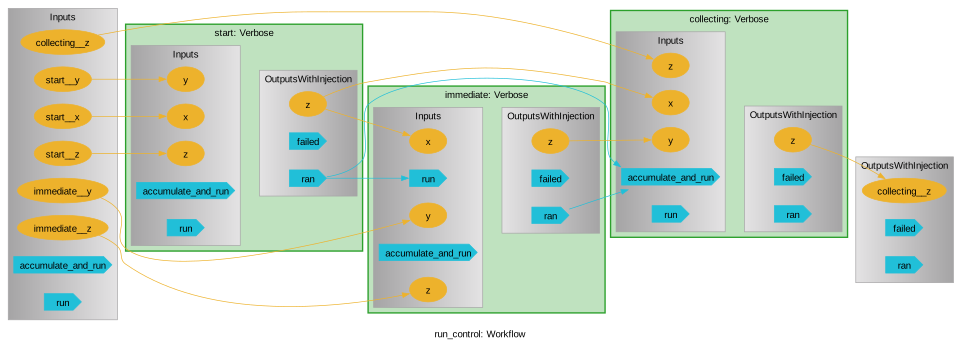
The same signals can be wired with the following syntactic sugar (and the >> can be chained together):
[138]:
wf = pwf.Workflow("sugar", automate_execution=False)
wf.start = Verbose("", "", "start")
wf.immediate = Verbose(wf.start, "", "immediate")
wf.collecting = Verbose(wf.start, wf.immediate, "collecting")

wf.start >> wf.immediate
wf.collecting << (wf.start, wf.immediate)

wf.starting_nodes = [wf.start]

wf()
  start
start  immediate
start immediate collecting
[138]:
{'collecting__z': 'collecting'}
State behavior and the executor motivation
If we look at the __getstate__ of a child, we will notice its parent has been purged:
[139]:
wf.immediate.__getstate__()
[139]:
{'_label': 'immediate',
 '_parent': None,
 '_detached_parent_path': '/sugar',
 'running': False,
 'failed': False,
 '_executor': None,
 'future': None,
 '_thread_pool_sleep_time': 1e-06,
 '_signals': <pyiron_workflow.io.Signals at 0x148b6d1c0>,
 'checkpoint': None,
 'recovery': 'pickle',
 '_remove_executorlib_cache': True,
 '_cached_inputs': {'x': 'start', 'y': '', 'z': 'immediate'},
 '_user_data': {},
 '_inputs': <pyiron_workflow.io.Inputs at 0x148b6f530>,
 '_outputs': <pyiron_workflow.mixin.injection.OutputsWithInjection at 0x148b6d430>}
And similarly the node’s connections get purged:
[140]:
wf.immediate.inputs.__getstate__()
[140]:
{'channel_dict': {'x': <pyiron_workflow.channels.InputData at 0x148b6d9d0>,
  'y': <pyiron_workflow.channels.InputData at 0x148b6da30>,
  'z': <pyiron_workflow.channels.InputData at 0x148b6f500>}}
But we see that the parent node retains state about both its children and their connections
[141]:
parent_state = wf.__getstate__()
parent_state["start"], parent_state["_child_data_connections"]
[141]:
(<__main__.Verbose at 0x148b03ad0>,
 [(('immediate', 'x'), ('start', 'z')),
  (('collecting', 'x'), ('start', 'z')),
  (('collecting', 'y'), ('immediate', 'z'))])
This is actually some important engineering. Sending a node off to a parallel process with an executor requires serializing data to send to the new process. For concurrent.futures.ProcessPoolExecutor and those compliant with it (our expectation for these circumstances) that involves using __getstate__ (well, __reduce__, but the state comes out under the hood). When we send a Function node off for parallel execution, we actually only send the Function.node_function (remember
it is a @staticmethod!!!) and the actual input data. But for Macro nodes, we necessarily send the entire node so there is something there to run the subgraph! If we sent the macro’s parent along, or its connections, we’d need to serialize the entire graph when we run just one piece on a separate process!
This careful management of state minimizes how much data we actually need to serialize
Executor limitations
In a similar manner, there are some things we can’t serialize, namely thread locks and other executor-related objects. That means that, at present, you can’t nest executors. The motivated reader can see that there is room to extend this, e.g. by accepting a node class (which is serializable) and some arguments for it and recreating one on-the-fly:
[142]:
from pyiron_workflow.mixin.run import Runnable

Runnable._parse_executor??
Object `Runnable._parse_executor` not found.
While loops
While-loops involve some circular flow of data that terminates on a particular data condition. Similarly to how for-loops are handled, we accomplish this by subclassing a While(Composite, StaticNode, abc.ABC) class that takes test and body node classes at subclassing-time. The parent While class contains logic to clean up its children at each (non-cached) run, and then dynamically adds new test and body children at runtime until the most recent test node returns False. In this way,
while-loops nodes prospectively know their IO and can be duly included in workflow recipes, but only know their full internal data provenance retrospectively. However, once they have run, this retrospective provenance is available by looking at their owned children just the same as any other macro (well, almost, there is some fudginess around the value links from the while-node inputs to their child node inputs). The cyclicty of the while-loop is defined by providing extra body-to-test and
body-to-body edges using their respective node classes IO names (i.e. strings) at subclassing-time.
There are a few constraints:
The testing node class must return a single output, and by default we’ll check to make sure it’s boolean-hinted
You must provide at least one tuple of strings defining a connection between the body and test node, and at least one tuple of strings defining a recursive connection of the body on itself
We can’t check anything else at the recipe level, so if the actual while loop terminates immediately you’ll wind up with
NotDataoutputs, and if it never terminates you’ll hit a python recursion depth error eventually (although you can specify maximum iterations to avoid this a-priori)
Let’s take a look:
[143]:
wf = pwf.Workflow("my_while_loop")
wf.x0 = pwf.std.UserInput(0)
wf.limit = pwf.std.UserInput(5)
wf.step = pwf.std.UserInput(2)
wf.add_while = pwf.while_node(
    pwf.std.LessThan,  # Test
    pwf.std.Add,  # Body
    [("add", "obj")],  # body-to-test
    [("add", "obj")],  # body-to-body
    strict_condition_hint=False,  # LessThan doesn't hint it's boolean return...
    test_obj=wf.x0,
    test_other=wf.limit,
    body_obj=wf.x0,
    body_other=wf.step
)
wf.xf = wf.add_while.outputs.add  # While output maps to body output
[144]:
wf.draw(size=(10, 10))
[144]:
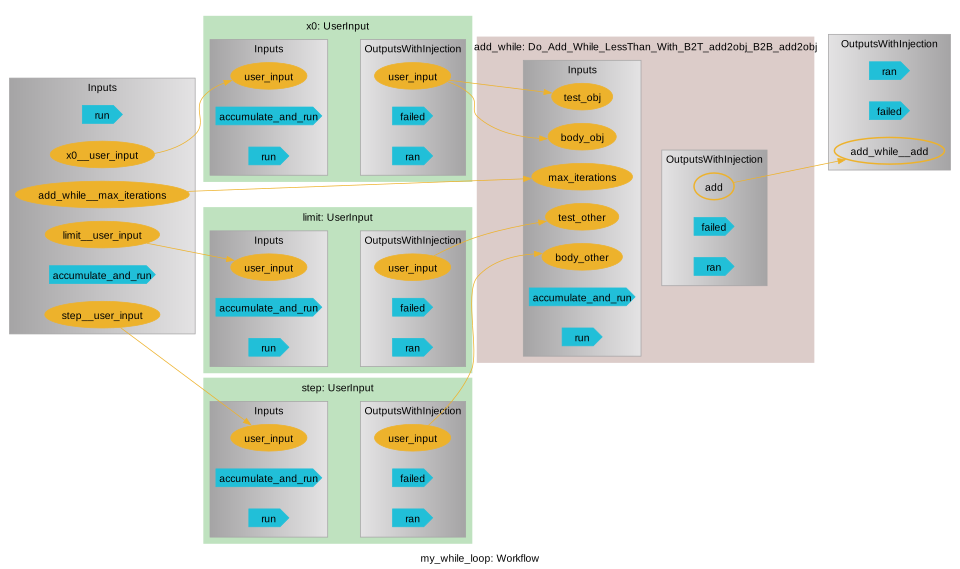
We see that the while-node automatically builds its input to reflect the inputs of both the test and body nodes (with appropriately prefixed labels), and adds an extra channel to limit the max iterations, while the outputs reflect the body node outputs directly.
[145]:
wf()
[145]:
{'add_while__add': 6}
And we nicely took steps of 2 until we were over our limit.
[146]:
wf.add_while.child_labels
[146]:
('test_0',
 'body_0',
 'test_1',
 'body_1',
 'test_2',
 'body_2',
 'test_3',
 'body_3')
Note that the final test node evaluated False, so we’re getting out output from the pen-ultimate body node, while the ultimate body node is vestigial
[147]:
wf.add_while.body_2.outputs.add.value
[147]:
6
[148]:
wf.add_while.body_3.outputs.add.value
[148]:
NOT_DATA
And, of course, we can save and load while loops as usual
[149]:
import pickle

reloaded = pickle.loads(pickle.dumps(wf))
reloaded.outputs.to_value_dict()
[149]:
{'add_while__add': 6}
Handling failure
Sometimes a node might fail – sometimes we might even anticipate the possibility. pyiron_workflow allows for this with the runtime flag raise_run_exceptions. There is even an output signal failed to allow you to manage flow control based off of node failure (although, like cyclic graphs, this requires manual management of the execution flow).
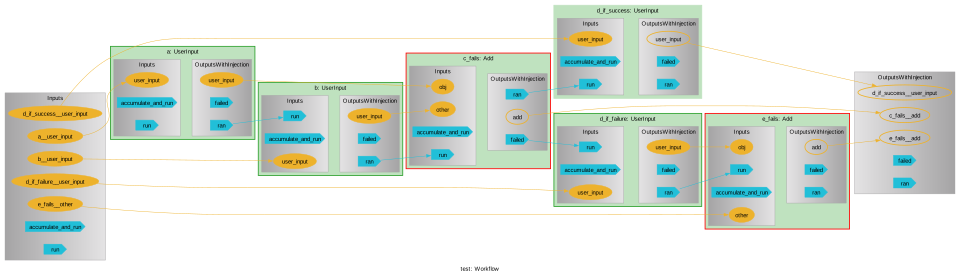
Here is an example of this feature, including chaining further execution off of a failure and having failure occur inside the context of an executor:
[150]:
from concurrent import futures

wf = pwf.Workflow("test")
wf.a = pwf.std.UserInput(1)
wf.b = pwf.std.UserInput("two")
wf.c_fails = wf.a + wf.b  # Type error
wf.d_if_success = pwf.std.UserInput(0)
wf.d_if_failure = pwf.std.UserInput("But what's the question?")
wf.e_fails = pwf.std.Add(wf.d_if_failure, 42)  # Type error

wf.a >> wf.b >> wf.c_fails >> wf.d_if_success
wf.c_fails.signals.output.failed >> wf.d_if_failure >> wf.e_fails
wf.starting_nodes = [wf.a]
wf.automate_execution = False

with futures.ProcessPoolExecutor() as exe:
    wf.c_fails.executor = exe
    wf(raise_run_exceptions=False)

wf.draw(size=(10, 10))
exception calling callback for <Future at 0x148a08110 state=finished raised TypeError>
concurrent.futures.process._RemoteTraceback:
"""
Traceback (most recent call last):
  File "/Users/liamhuber/dev/miniforge3/envs/pyiron12/lib/python3.12/concurrent/futures/process.py", line 263, in _process_worker
    r = call_item.fn(*call_item.args, **call_item.kwargs)
        ^^^^^^^^^^^^^^^^^^^^^^^^^^^^^^^^^^^^^^^^^^^^^^^^^
  File "/Users/liamhuber/dev/pyiron/pyiron_workflow/pyiron_workflow/node.py", line 461, in on_run
    return self._on_run(*args, **kwargs)
           ^^^^^^^^^^^^^^^^^^^^^^^^^^^^^
  File "/Users/liamhuber/dev/pyiron/pyiron_workflow/pyiron_workflow/nodes/function.py", line 318, in _on_run
    return self.node_function(**kwargs)
           ^^^^^^^^^^^^^^^^^^^^^^^^^^^^
  File "/Users/liamhuber/dev/pyiron/pyiron_workflow/pyiron_workflow/nodes/standard.py", line 506, in Add
    return obj + other
           ~~~~^~~~~~~
TypeError: unsupported operand type(s) for +: 'int' and 'str'
"""

The above exception was the direct cause of the following exception:

Traceback (most recent call last):
  File "/Users/liamhuber/dev/miniforge3/envs/pyiron12/lib/python3.12/concurrent/futures/_base.py", line 340, in _invoke_callbacks
    callback(self)
  File "/Users/liamhuber/dev/pyiron/pyiron_workflow/pyiron_workflow/mixin/run.py", line 353, in _finish_run
    raise e
  File "/Users/liamhuber/dev/pyiron/pyiron_workflow/pyiron_workflow/mixin/run.py", line 344, in _finish_run
    run_output = run_output.result()
                 ^^^^^^^^^^^^^^^^^^^
  File "/Users/liamhuber/dev/miniforge3/envs/pyiron12/lib/python3.12/concurrent/futures/_base.py", line 449, in result
    return self.__get_result()
           ^^^^^^^^^^^^^^^^^^^
  File "/Users/liamhuber/dev/miniforge3/envs/pyiron12/lib/python3.12/concurrent/futures/_base.py", line 401, in __get_result
    raise self._exception
TypeError: unsupported operand type(s) for +: 'int' and 'str'
[150]:
Storage interfaces
We saw in quickstart.ipynb how to save and load nodes to/from their default location (based on the current working directory and their lexical label), and how to use checkpointing and autoloading with the built-in "pickle" storage back end.
We can also save and load using an explicit storage interface instance. This allows us to save and load at non-standard locations:
[151]:
wf = pwf.Workflow("custom_save_location")
wf.cant_spell = pwf.std.UserInput("slaughter")
wf.without = wf.cant_spell.contains("laughter")
wf()
[151]:
{'without__in': True}
[152]:
storage = pwf.api.PickleStorage()
storage.save(wf, "../someplace_else")
[153]:
try:
    reloaded = storage.load(filename="../someplace_else")
    assert(reloaded.outputs.without__in.value == wf.outputs.without__in.value)
finally:
    # Clean up
    storage.delete(filename="../someplace_else")
And also to specify interface settings – these can also be set on a per-operation level using kwargs, but for something like checkpoint the operations happen in a built-in way where we don’t have the ability to modify the kwargs to the call, so we need to adjust the settings right in the interface.
For PickleStorage the only setting is whether to allow a fallback to cloudpickle, so let’s turn that off and construct an example where we’d see the failure:
[154]:
def outer_function():
    def inner_function(x):
        return x
    return inner_function
[155]:
wf = pwf.Workflow("doomed")
wf.unpickleable = pwf.function_node(outer_function())
wf(unpickleable__x=2)
[155]:
{'unpickleable__x': 2}
There’s nothing inherently wrong with the node and it runs fine, but the function comes from a <local> scope, so we won’t be able to pickle it
[156]:
no_fallback = pwf.api.PickleStorage(cloudpickle_fallback=False)
wf.unpickleable.checkpoint = no_fallback
try:
    wf.recovery = None  # We know this will fail and don't care about a recovery file
    wf(unpickleable__x=3)
except pwf.api.TypeNotFoundError as e:
    print("TypeNotFoundError:", e)
TypeNotFoundError: doomed cannot be saved with the storage interface PickleStorage because it (or one of its children) has a type that cannot be imported. Is this node defined inside <locals>?
Import readiness report:
doomed: NOT IMPORTABLE
        unpickleable: NOT IMPORTABLE
Extensions
The pickle interface inherits from a more generic StorageInterface, which uses abstract methods to specify what Node expects from an interface that sits between itself and a serialization routine. Further storage backends are possible by subclassing this base class.
[ ]: